The Best thinkorswim Alternatives in 2026: 6 Tools by Job

Named to the Inc. 5000 list of America’s fastest-growing private companies six years in a row (2017–2022).
Investopedia: Best Short Term Stock Screener, 2024
The short answer: Most people searching for a thinkorswim alternative keep their Schwab account and add a tool. For a dedicated scanner with AI and backtesting that runs beside your broker, Trade Ideas. For charts across world markets, TradingView. For charting on a budget, TC2000. For news, Benzinga Pro. Trade Ideas makes one of the tools on this page.
This page is on Trade Ideas' own website. See our Trade Ideas vs thinkorswim page for a head-to-head view.
thinkorswim alternatives, by what you need
- A dedicated scanner with Holly AI and OddsMaker: Trade Ideas.
- Charts across world markets: TradingView.
- Charting on a budget: TC2000.
- Quick web screens: Finviz Elite.
- News and catalysts: Benzinga Pro.
- Automated chart analysis: TrendSpider.
- Stay with thinkorswim if you are a Schwab client and want scanning inside the same software as your orders.
What thinkorswim does well
thinkorswim is the trading software Schwab provides. Its Stock Hacker scanner searches on criteria you pick, and custom criteria can be written in thinkScript.
It sits next to your brokerage account, so research and order entry live in one place for Schwab clients.
For Schwab clients who want scanning inside their broker software, that is a complete free option.
The full comparison is on Trade Ideas vs thinkorswim.
Why Schwab traders add Trade Ideas as a thinkorswim alternative
- Dedicated live scanner. Some traders want a separate tool focused on Streaming Alerts across the US market.
- AI signals with a trade plan. Schwab's thinkorswim pages do not list AI signals with an entry, a stop and a target.
- No-code backtesting. thinkScript can build strategy testing. A no-code OddsMaker-style tool is not listed.
- Ready-made channels. Beginners who want Channel Bar presets may prefer a tool built around them.
How we compared thinkorswim alternatives
Each thinkorswim alternative went through the same six checks. You can see the sources in How we checked.
- Replaces: what each tool could take off thinkorswim's plate, or add beside it.
- Real-time data: whether quotes and scans are live on each plan.
- Backtesting: testing on history, with or without code.
- AI: AI features listed by name on the vendor's site.
- List price: what each pricing page shows per month and per year.
- Best for: the type of trader each tool helps most.
thinkorswim alternatives, side by side
| Tool | Replaces which part of thinkorswim | Real-time data | Backtesting | AI | List price | Best for |
|---|---|---|---|---|---|---|
| Trade Ideas | Dedicated live scanning beside your broker | Yes. Both plans are on live market data | OddsMaker, no code (TI Premium / Apex) | Holly AI Signals, Premium; Holly AI Assistant, every TI Pro plan | Standard (Core) $127 per month or $1,068 per year; Premium $254 per month or $2,136 per year | Scanner with AI and backtesting |
| TradingView | Charts and world markets | Screener auto-refresh on paid plans | Strategy backtesting; Bar Replay | AI screener requests | Basic $0; paid plans from $12.95/mo billed annually | Chart-first traders |
| TC2000 | Charts and scans | Real-time scanning on Premium | Not listed | Not listed | Basic $24.99 to Premium+ $99.99/mo | Budget charting |
| Finviz Elite | Web screens | Elite: real-time | Not listed | Not listed | Free; Elite $39.50/mo or $299.50/yr | After-hours screens |
| Benzinga Pro | News and catalysts | Real-time quotes on paid plans | Not listed | Benzinga AI (Essential) | Basic $37 to Essential $197 a month | News-driven traders |
| TrendSpider | Chart automation | Real-time US data (non-pro) | Yes, every plan | Sidekick assistant | Standard $59 to $89/mo by term; up to $349/mo | Chart automation |
Swipe sideways to bring the hidden columns into view.
"Not listed" means the company's pages didn't mention it when we looked.
The 6 best thinkorswim alternatives
-
1. Trade Ideas
Best for a dedicated scanner with AI and backtesting alongside your broker
Trade Ideas is scanning and AI software, not a broker. You run it next to thinkorswim or any other account. Streaming Alerts are the scanner. Top Lists are the screener. TI Premium, the higher plan, includes OddsMaker and Holly AI Signals. Your brokerage account stays where it is.
Replaces: Nothing at your broker. It adds live scanning, AI signals and no-code testing next to it.
- Real-time data
- Live market data on both plans. Streaming Alerts can trigger on every single trade.
- Scans and alerts
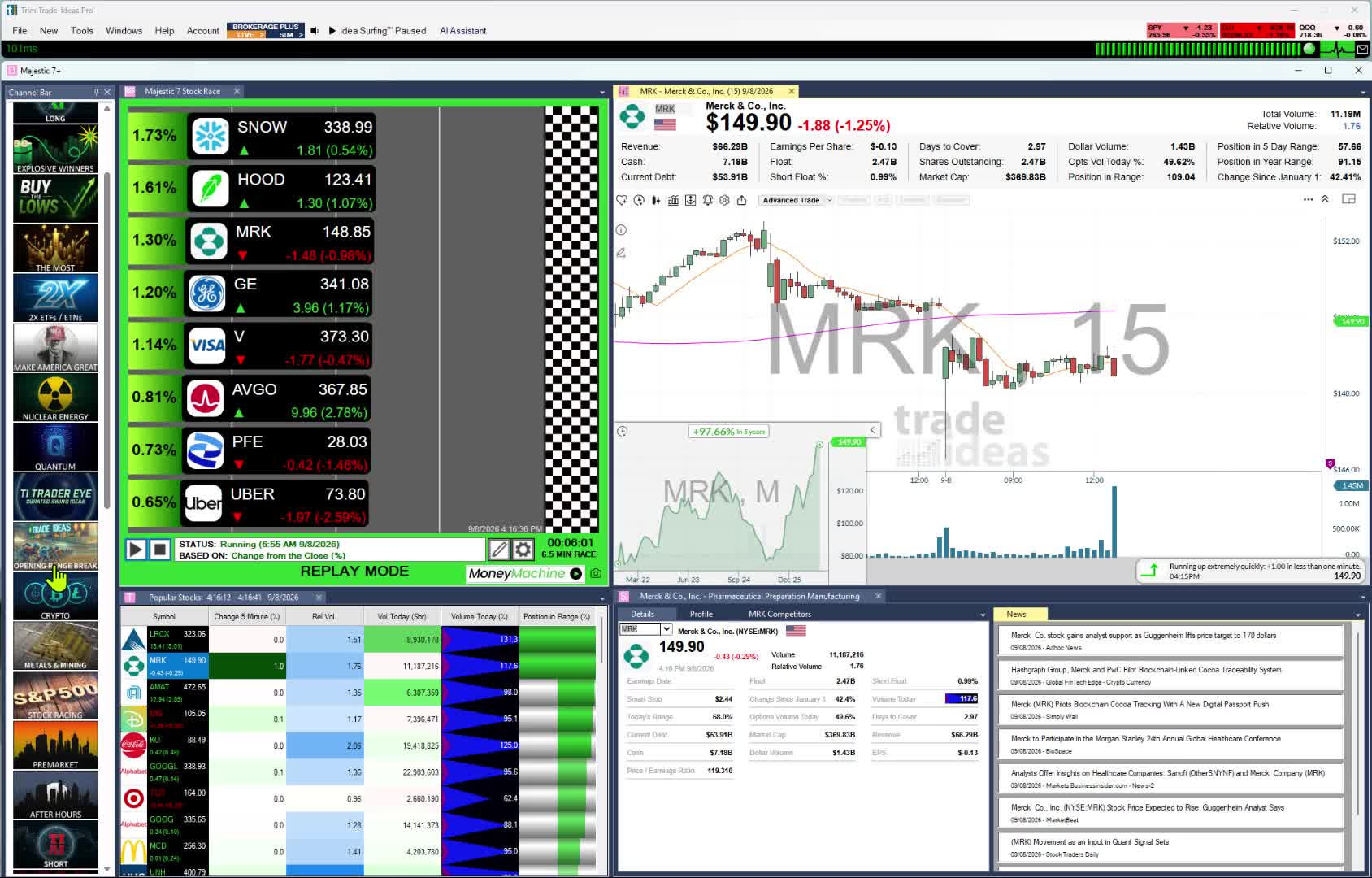
- 310 alerts and 249 filters, no thinkScript needed. Every TI Pro plan ships with Channel Bar presets. Requests to the Holly AI Assistant can be plain English; it then opens the matching Alert window or Top List.
- Backtesting
- OddsMaker tests a strategy on Trade Ideas history without writing code. It is part of TI Premium.
- AI
- With TI Premium, Holly AI Signals post an entry, a stop and a target during market hours.
- Beginner-friendly
- Yes. No configuration to start. In the free Trading Room, Barrie Einarson trades in real time while you watch.
- Price
- Two subscriptions sit next to any broker account: TI Standard ($127 monthly, $1,068 yearly) and TI Premium ($254 monthly, $2,136 yearly). Joining the Trading Room is free.
No thinkScript required. Trade Ideas ships 310 alerts and 249 filters, and the help gives each one its own page. Common technical events are already alerts, such as a 20/200 SMA cross up on 5-minute bars, a 15-minute dark cloud cover or a 15-minute opening range breakout; the opening range set covers breakouts and breakdowns at 1, 2, 5, 10, 15, 30 and 60 minutes. Stack any alert with any filters and set a minimum and maximum on each. 191 alerts add their own dial, for example the days of lookback on a New High (0 to 366), which takes the number of possible scans well past anything you could list.
Worth knowing: Trade Ideas scans US-listed stocks, and it is not a broker. Holly AI Signals, OddsMaker and Money Machine sit in TI Premium, separate from any Schwab account. TI Pro is a Windows desktop app; on a Mac, the browser-based web Dashboard opens with no download, though Holly and Streaming Alerts stay in TI Pro.
A scan builder beside Schwab. Describe a scan to the AI Assistant, or put one together from 310 alerts and 249 filters without thinkScript or any other code. For something custom, write a filter in the Formula Editor. OddsMaker for testing it, and Holly AI Signals with entry, stop and target on every signal, come with TI Premium.
Best fit: thinkorswim users who want a dedicated scanner and AI beside their orders, and beginners who want the premium experience.
-
2. TradingView
Best for charts outside your broker account
thinkorswim lives inside a Schwab account. TradingView is a separate chart tool. Custom studies use Pine Script, and the screeners take in stocks, ETFs and crypto from 150+ exchanges in 50+ countries.
Replaces: thinkorswim charting and screening, plus markets outside the US.
- Real-time data
- Screener results auto-refresh at 10-second or one-minute intervals on paid plans. Some exchanges sell real-time data as an add-on.
- Scans and alerts
- Screen on 500+ fundamental and technical fields. Pine Screener and alerts are listed features.
- Backtesting
- TradingView names strategy backtesting and Bar Replay.
- AI
- Paid tiers carry 100 to 500 AI screener requests.
- Beginner-friendly
- Yes. A free Basic plan is available.
- Price
- Basic is $0. Paid plans, billed annually, are $12.95 (Essential), $29.95 (Plus) and $59.95 (Premium) a month (special price on Oct 5, 2026).
Worth knowing: The screener refreshes on its own only with a paid plan. thinkScript studies would need to be rebuilt in Pine Script.
Best fit: Traders who want a chart tool apart from their broker, across many markets.
-
3. TC2000
Best for dedicated charting on a budget
Charts come first in TC2000, and scanning is part of the same software. It is a step for traders who want a chart tool outside their broker.
Replaces: thinkorswim charts and technical scans.
- Real-time data
- Real-time US stock data (Nasdaq Basic) is included in Basic. Real-time scanning and sorting are on Premium.
- Scans and alerts
- Scans run on indicators, formulas and chart data, five streaming scans at most.
- Backtesting
- Not listed.
- AI
- Not listed.
- Beginner-friendly
- Fair. Paper trading is part of it. Charts come first.
- Price
- Basic is $24.99 a month, Premium $49.99 and Premium+ $99.99. Two months are free with annual billing.
Worth knowing: You need Premium before scans update in real time.
Best fit: Chart and swing traders who want separate software at a modest price.
-
4. Finviz Elite
Best for browser screens after the close
Finviz runs in a web browser, with screens and market heat maps. There is a free version and a paid one called Elite.
Replaces: Stock Hacker screens you only check once a day.
- Real-time data
- Quotes on the free version are delayed. For real-time quotes, 4:00 a.m. to 8:00 p.m. ET, you need Elite.
- Scans and alerts
- Alerts, saved presets and advanced filters come with Elite. Screens refresh on their own every 10 seconds.
- Backtesting
- The Elite page does not list it.
- AI
- Not listed.
- Beginner-friendly
- Yes. The layout is plain, and you can stay on the free version.
- Price
- $0 for the free version. Elite: $39.50 a month, or $299.50 a year.
Worth knowing: Expect a 3-minute wait between refreshes if you stay free. Finviz does not list a live event scanner.
Best fit: Investors who want a fundamental screen without opening broker software.
-
5. Benzinga Pro
Best for news and catalysts
Benzinga Pro is a news service first. You also get audio squawk and calendars, plus a real-time scanner.
Replaces: The news panel at your broker, plus a scanner on Essential.
- Real-time data
- Every paid plan includes real-time quotes from Nasdaq Basic. The Real-Time Scanner comes with Essential.
- Scans and alerts
- Benzinga says the scanner monitors 3,000+ stocks. Streamlined adds newsfeed filters for price, volume and float.
- Backtesting
- Not listed.
- AI
- Benzinga AI research is part of Essential.
- Beginner-friendly
- Yes. Seeing the news next to a move makes it easier to follow. There is a 14-day free trial.
- Price
- Basic is $37, Streamlined $147 and Essential $197 a month. Annual billing costs less.
Worth knowing: The Real-Time Scanner is on Essential, the $197 plan. A live teaching room is not listed.
Best fit: Traders whose ideas start with a headline.
-
6. TrendSpider
Best for chart automation without code
In thinkorswim you would script this in thinkScript. TrendSpider automates the technical analysis for you. Beyond auto-drawn trendlines, it handles scans, backtests and order automation.
Replaces: thinkScript chart studies, scans and strategy tests.
- Real-time data
- Non-professionals pay nothing for real-time US stock data. Standard scans every 2 hours; higher tiers go as often as once a minute.
- Scans and alerts
- Scans can be strategy-based, multi-timeframe or scheduled.
- Backtesting
- Yes. Every plan includes backtesting.
- AI
- 25 Sidekick AI assistant messages a month, on all plans.
- Beginner-friendly
- Fair. All plans include a training session at least once a year.
- Price
- Standard runs $59 to $89 a month by billing term. Plans go as high as $349 a month.
Worth knowing: Scan frequency is set by the plan. Trials are $19 to $49.
Best fit: Technical traders who want automation without writing thinkScript.
Who should stay with thinkorswim
Many Schwab clients have no reason to leave thinkorswim. You fit that group if any of these is true.
- You are a Schwab client and want scanning in the same place as orders. thinkorswim is built for that.
- Your software budget is $0. Schwab clients pay nothing for thinkorswim.
- You write custom scans in thinkScript. thinkorswim is the home for thinkScript.
- Options trading at Schwab is your main workflow. thinkorswim is built around that account.
Switching from thinkorswim: what carries over
Trade Ideas is a dedicated scanner with AI and backtesting you can run alongside your broker. It is not a broker replacement. The rows below map thinkorswim habits to Trade Ideas tools.
| If you use this in thinkorswim | In Trade Ideas |
|---|---|
| Stock Hacker scans | Streaming Alerts and Top Lists, both on live market data. |
| thinkScript custom studies | Custom logic goes in the Formula Editor, which uses Trade Ideas' own formula language. Or just ask the AI Assistant in plain English. |
| Trade entry at Schwab | Nothing changes at your broker. Trade Ideas runs beside your brokerage account, not in place of it. |
| PaperMoney practice | Paper trading on live prices with TI Standard. |
| Added when you switch | Holly AI Signals on TI Premium, each giving an entry, a stop and a target. |
| Added when you switch | OddsMaker on TI Premium, for backtests without code. |
| Added when you switch | Channel Bar presets, ready on every plan. |
| Added when you switch | The Trading Room with Barrie Einarson, at no cost. |
Swipe to line up thinkorswim with Trade Ideas.
Channel Bar and Streaming Alerts
Stock Hacker asks you to build criteria first. The Channel Bar skips that step. Both plans include it in TI Pro. Open Big Momentum Movers, or S&P 500 stocks moving up quickly, and you have a live list. See Trade Ideas for beginners.
Streaming Alerts are the scanner and fire as trades happen. Every 15 seconds, Top Lists, the screener, re-rank what passes your filters. Both use live market data.
Holly AI Signals and OddsMaker
Add TI Premium and Holly AI Signals show up in the session, each listing the entry, stop and target levels. You then place the order at your broker and decide when to exit.
OddsMaker is the no-code answer to thinkScript strategy testing. It checks a scan against Trade Ideas history.
Past results, including backtests, don't guarantee future results.
Adding Trade Ideas next to thinkorswim in six steps
- Pick a plan to sit beside Schwab. Next to your Schwab account, TI Standard runs the Holly AI Assistant, Streaming Alerts and Top Lists, and it has paper trading for practice. Add TI Premium when you want Holly AI Signals, OddsMaker and Money Machine working beside thinkorswim.
- Open one ready channel. Big Momentum Movers on the Channel Bar shows you movers right away.
- Translate a Stock Hacker scan. Tell the AI Assistant what it does, or start from a new high alert.
- Try it risk-free. Paper trading runs on live prices.
- Test without thinkScript. On TI Premium, OddsMaker checks the setup on past days.
- Learn in the room. The Trading Room is free. New traders should see Trade Ideas for beginners.
What thinkorswim and Trade Ideas cost
thinkorswim
- thinkorswim: no charge for Schwab clients
Schwab lists $0 online equity commissions and $0.65 per options contract. Prices checked October 6, 2026.
Trade Ideas
- TI Standard: $127 every month, or $1,068 once a year (about $89 a month)
- TI Premium: $254 every month, or $2,136 once a year (about $178 a month)
On top of your Schwab account, every Trade Ideas plan brings the Channel Bar and the Holly AI Assistant in TI Pro. Upgrading to TI Premium brings Holly AI Signals, OddsMaker and Money Machine to the setup you run next to Schwab. The Trading Room costs nothing.
Figures checked October 6, 2026. Look again on each site before you sign up, as prices change.
Since thinkorswim costs Schwab clients nothing, the Trade Ideas fee pays for the scanner alone: a database designed in-house and improved across more than two decades, Streaming Alerts able to fire on every trade, and Top Lists that update every 15 seconds.
How we checked
- Primary sources. Facts about thinkorswim come from Schwab's own pages, and facts about other tools come from their makers.
- "Not listed" has one meaning. We couldn't find it on those pages, nothing more.
- Why Trade Ideas tops the list. People who add a tool beside thinkorswim usually want a dedicated live scanner with AI signals and no-code testing. Trade Ideas does that job, and it does not replace your broker. We make it, so weigh our view against the others.
- The rest follow by job. Dedicated scanning first, then charts, news and education tools.
- No scoring. None of these tools gets a star rating from us.
Where we looked (October 6, 2026): trade-ideas.com/pricing; schwab.com/trading/thinkorswim; tradingview.com/pricing; tc2000.com/pricing; finviz.com/elite; pro.benzinga.com/pricing; trendspider.com/pricing.
Edits so far: this is the first version, published October 6, 2026. Schwab and competitor facts were checked that day.
thinkorswim alternatives: FAQ
What is the best alternative to thinkorswim?
For a dedicated live scanner with AI and backtesting next to your broker, we recommend Trade Ideas. It's ours, so test it yourself. It does not replace thinkorswim or your Schwab account.
Is there a free alternative to thinkorswim?
Yes, a few, with limits. thinkorswim is already free for Schwab clients. TradingView Basic is $0, and Finviz has a free version. Trade Ideas keeps its Trading Room free and sells the software as a subscription.
What is the cheapest thinkorswim alternative?
On October 6, 2026, thinkorswim cost Schwab clients nothing. Of the paid tools here, TradingView Essential was $12.95 a month billed annually and TC2000 Basic was $24.99 a month.
Is Trade Ideas good for beginners?
Yes. Next to a full broker screen, Trade Ideas is a good fit for a beginning trader who wants the premium experience. Configuration is not required: pick a Channel Bar preset in TI Pro. Standard and Premium each include the Holly AI Assistant in TI Pro. Read Trade Ideas for beginners.
What does Trade Ideas cost if thinkorswim is free?
thinkorswim was no charge for Schwab clients on October 6, 2026. Trade Ideas is a paid add-on that you run beside your Schwab account, at $127 a month or $1,068 a year for TI Standard and $254 a month or $2,136 a year for TI Premium.
Is Trade Ideas just for day trading?
No. Holly AI Signals come during the trading day, but you can hold the position at your broker as long as you want. For investors, Streaming Alerts and Top Lists help time when to open a position at Schwab.
Does Trade Ideas replace my broker?
No. It is scanning and AI software that runs next to thinkorswim or any broker. Orders still go through your brokerage account.
Can I scan in Trade Ideas and trade in thinkorswim?
Yes. That is a common setup. Find the stock in Trade Ideas, then place the order in thinkorswim.